Once a permit has been filed by one of your Scouts/Scouters you will need to approve it, else it is not considered valid.
To do so – you must login to your profile on the Permit System and find the permit you want. For best results have the permit applicant send you the permit number before hand.
Finding The Permit
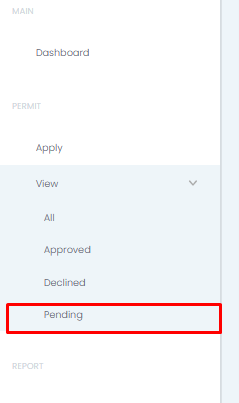
On your side menu you can select View >> Pending
Alternatively, you can use the Filter on the right hand side to find the permit/permit applicant/date range etc
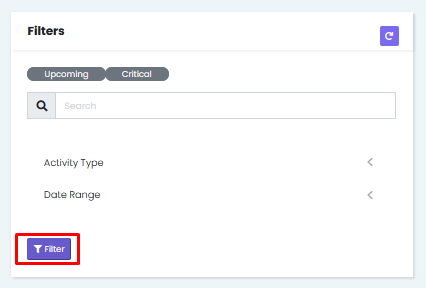
Either way, you will eventually find the permit that you are there to process.
Processing The Permit
Once you have found the permit you are looking for you must ensure that the permit is in line with the Minimum Permit Requirements. If you are satisfied that it is, you scroll to the bottom of the page. If you need to decline the permit for any reason you would click Decline and then be prompted to enter a reason – usually it is a duplicate or similar.

If however you are intending to approve the permit then you would need to note the following:
Provisional Approval: Permit requires a two person approval sign off
Final Approval: Permit either only needs one sign off, or it has already been provisionally approved
To find out who is needed to approve which permit, as well as which permit would need one or two approvals you can view the Safe Scouting Policy (Here) and go to pages 12-14.
Once you click Provisional Approval you will see the following:
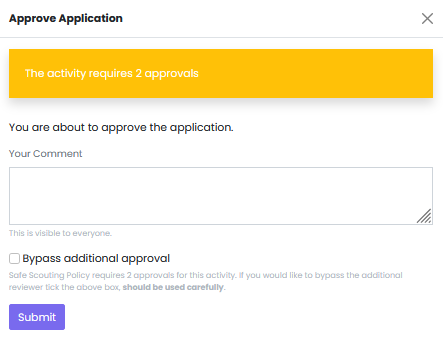
Here you are able to add comments alongside your approval. You also have the option to bypass second approval but this should not be used lightly. When ready click Submit and then it is over to the next scouter to approve.
If you are approving a Final Approval permit then you will click on Final Approval.
Was this helpful?
0 / 0