This task is available to all Scouter roles within the group. Failure to complete this step will mean that you cannot capture attendance for your meetings.
Adding Programmes
To add a programme, you need to go to your left hand meny and click on Group Management >> Programs >> Add a Program. From here you will need to capture the necessary information.
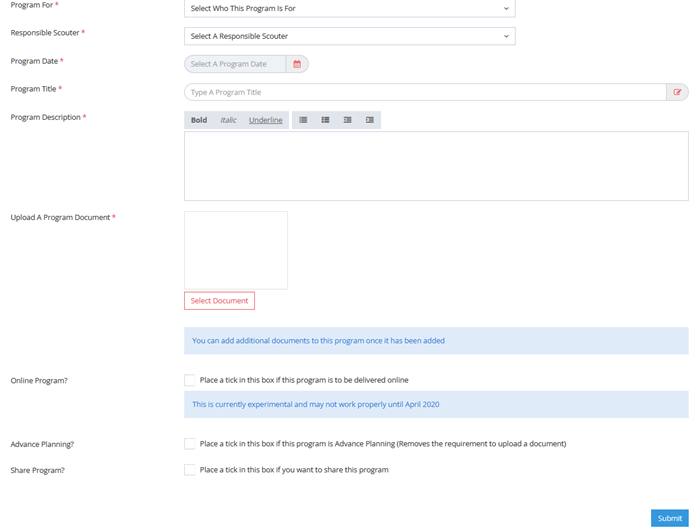
Program For: Troop, Pack, Den, Patrol, Group, etc
Responsible Scouter: The WARRANTED Scouter who is overseeing the activity
Program Date: Date the program will be taking place
Program Title: Can be anything you want (advise if to use the date as then referencing is easy)
Program Description: No need to write essays. Something simple and to the point
Upload a Program Document: Again, nothing too heavy. Just a brief on what is happening
Once done you can then click SUBMIT at the bottom and it will be loaded.
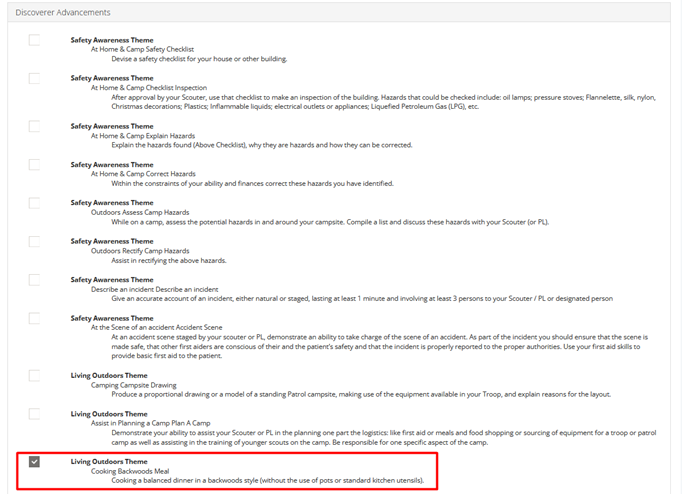
It should be noted that you can also automatically have Advancements ticked off via the program system. To do this, when you upload a programme, you need to go to the section below and tick off which items will be relevant to that programme. For example, if you run a meeting where your scouts cook a backwoods meal you can go down to Discoverer and tick COOKING BACKWOODS MEAL. This should then mean that any scout in attendance will have that automatically signed off.
Managing Programmes
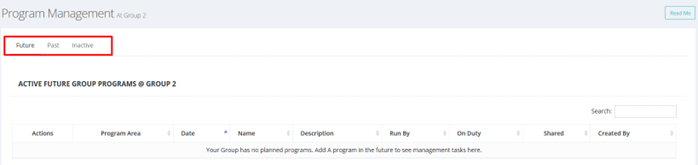
Reasonably self-explanatory in that this section is just here to allow to you go through programs that have been uploaded to the Group’s profile on Scouts.Digital. You can view Future or Past Programs if you wish, as well as being able to filter them by Unit.
Was this helpful?
0 / 0